

Summary: You may need to convert emails from EML files to PST format due to many reasons. But sometimes you need a few emails to export from EML format to PST format without any losses. So, just go through this post, and by the end of it, you will get the solution to freely convert EML emails into PST file format.
Messages in EML format are used by various email clients such as Windows Live Mail, Thunderbird, Apple Mail, eM client, etc. But many users are migrating towards MS Outlook as it comes with advanced features and for this, users need to convert EML files into Outlook PST file format.

Microsoft Outlook can’t directly open & read EML files and does not offer any way to import them. So, if you have multiple EML files to open in your Outlook profile, first you need to convert EML data file items into PST format.
Need to Convert EML Mail Files to PST format
Users may find the need to convert EML mailbox data to PST format for Outlook due to several reasons:
- When you switch from Windows Live Mail to Outlook, there comes a need to convert Windows Live Mail emails (.eml) to PST file format.
- EML files store only single message details whereas PST can hold entire mailbox emails, attachments, contacts, notes, etc.
- MS Outlook is a highly secure and friendly application than EML-based applications
How to Convert All EML files into Outlook PST format?
Users have two possible ways to convert desired or all EML data files into PST file format.
Method 1. Manually export EML data items to PST file
Method 2. Selected or All EML files exported to PST with a professional tool
Note: Before you make mind to use the free method, check its limitations.
Method 1. Free Manual Conversion of EML file data to PST format
Follow below-listed steps to manually convert EML file items to PST file format for free:
Step 1. Go to the location (folder) where you have stored EML files
Step 2. Import EML files into Microsoft Outlook
- Start the Microsoft Outlook program
- Open the folder of EML files. Drag & drop EML data files to any folder of Outlook. (This will work for limited files and won’t support bulk EML files drag & drop)
Step 3. Export emails into PST file
- Launch your Outlook program
- Navigate to File, then on Open & Export to reach to Import/Export option

- Once Import/Export wizard will open, you have to choose the option Export to file and press

- Hit on Outlook .pst option and then go for Next
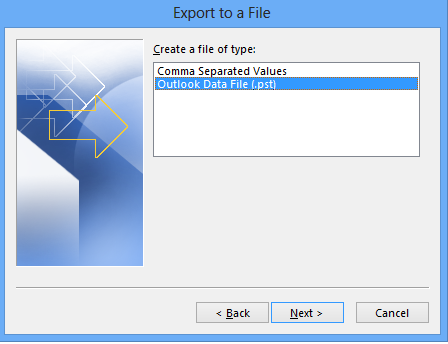
- Pick the folder from Outlook to export & then press the Next button

- Browse the targeted path to save the new PST file and hit Finish

Check Limitations of Manual Method
Though the manual method seems comfortable to your eyes it has many disadvantages that you must know:
- Not trusted and secure way when you have unlimited emails for conversion
- Sometimes drag & drop action can freeze MS Outlook and thus lead to file corruption
- While using the manual method, you need to be calm & patient as it will consume a lot of time depending on the amount of data for conversion.
- Email attachments rarely transferred in PST file
- Users must have proper knowledge of MS Outlook technicalities
Method 2. Verified Professional Tool to directly Convert EML data items into PST
If you want a reliable, quick, and verified method, then you must opt WholeClear EML to PST Converter Software. This is a completely analyzed program by experts and is highly recommended to use. This outstanding program provides the ‘Add Files’ or ‘Add Folder’ option to add unlimited EML files into the software for conversion into PST file format. The interface of the program is highly attractive & friendly so that users won’t need prior technical intelligence.
This proficient utility allows multiple EML files direct export to PST files without any restrictions. Desired EML files can be loaded into the software to get PST files as output.
Steps to use this third-party utility:
- Make sure to properly install and start the recommended software on your Windows computer.
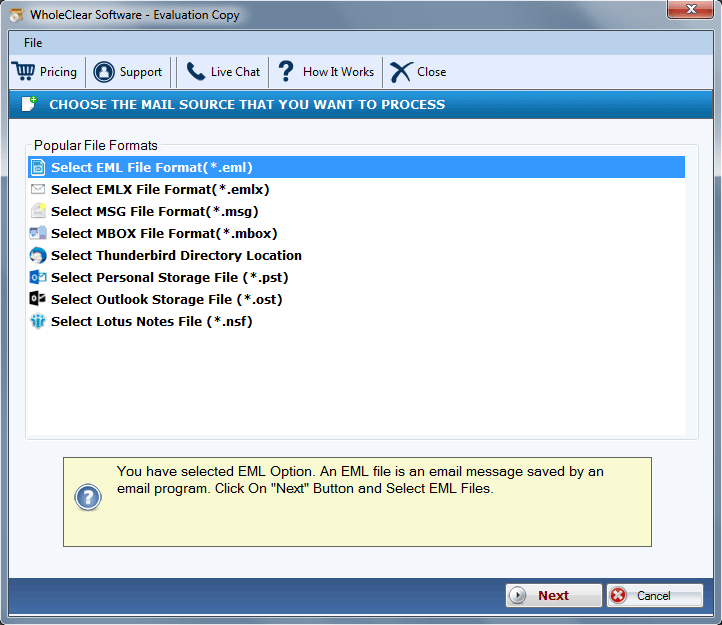
- The list of added EML files will display. Hit Next for the next step or you can go to the ‘Add More Files’ option for adding more EML files if required.
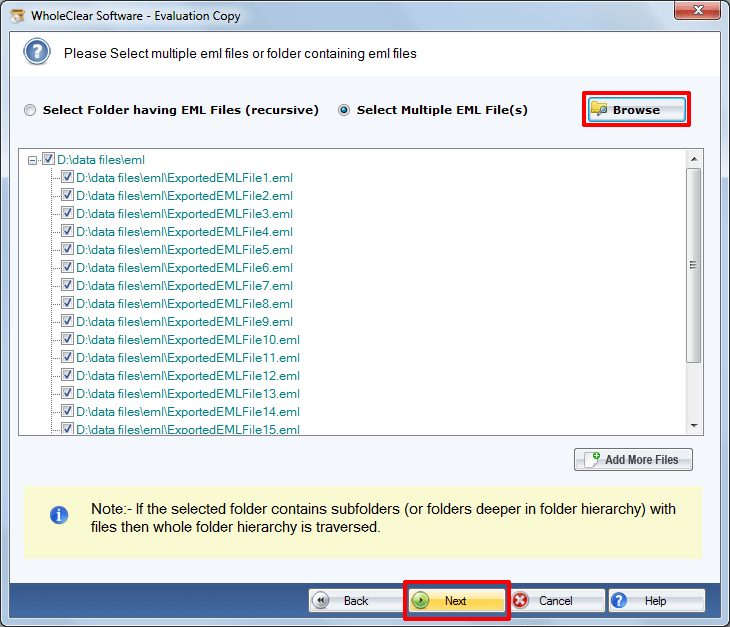
- Then, add the required EML data files that you want to convert into PST file format.
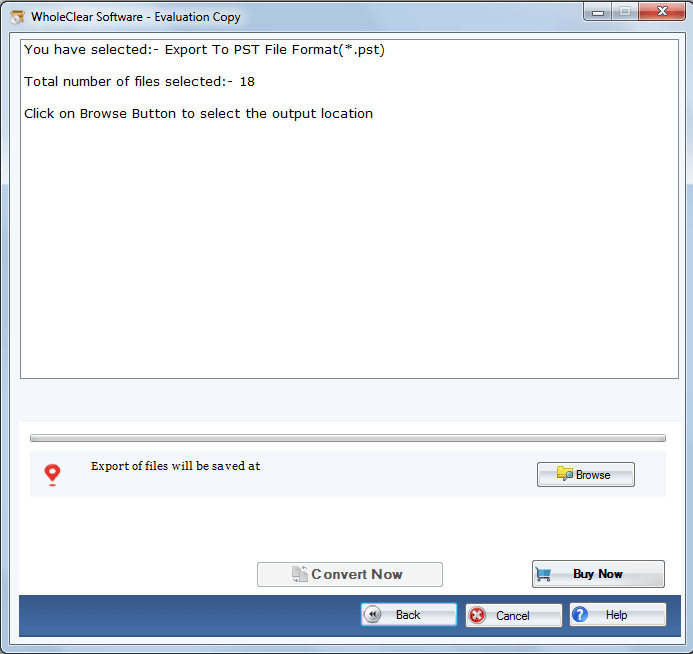
- Browse the destination where you want to save the resultant PST file.
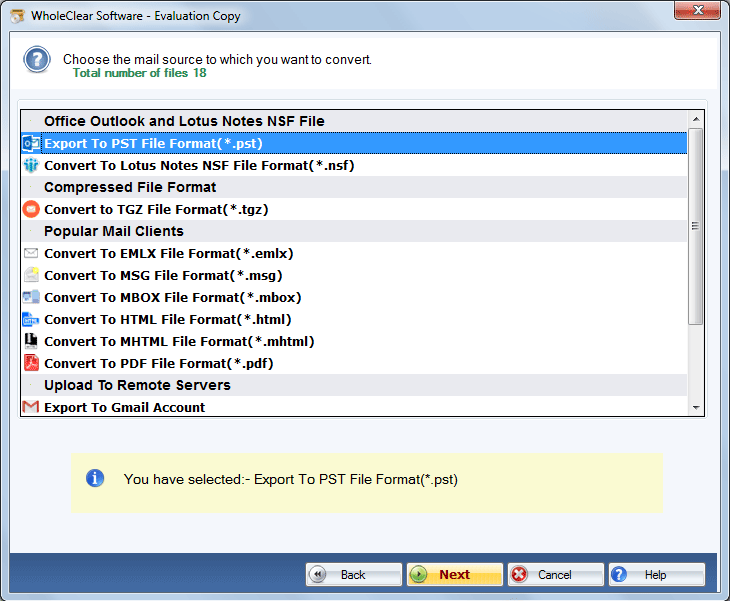
- Move the mouse pointer to the Convert button to begin the process of exporting EML data files into Outlook PST file format.
Now, you have got a PST file which you can open any time with any MS Outlook version such as 2021, 2019, 2016, 2013, 2010, etc.
Robust Features provided by Third-party Software
- Export EML database files to PST format keeping email formatting, folder structure, and attributes intact.
- Support export of EML files into Unicode PST format to read in all MS Outlook versions
- Any email client support is not necessary for performing the conversion
- Safely transfer attachments with EML email messages to PST file format
- Selected or all EML files direct export to PST file format
- 100% accurate and trouble-free migration with no chance of data loss
- Freeware edition to convert first 25 EML files data into PST file format
- Display list and number of added EML files before export to Outlook PST file
Conclusion
Well, through this post, we have described two methods – manual and professional to convert EML mail data items to PST file format. But the free method comes with limitations and is not a reliable solution. So, we always recommend opting for professional software that facilitates smart and safe conversion. To check the working of this software, download the free trial first and then apply for the license version. In case of any query, contact our support staff 24*7.