

Summary: It is annoying and frightening situation when your IMAP email account is inaccessible. At that time, you have a fear of losing important contacts and emails. You can your IMAP email server not responding issues with some measures. The article provides you some effective measures to make your IMAP email server accessible.

Importance of IMAP Server
- IMAP (Internet Message Access Protocol) is a protocol to transfer and access email messages from a mail server such as Gmail, Yahoo, AOL, Hotmail, etc. There are two email retrieval protocols, one is IMAP and the other is POP (Post Office Protocol).
- POP helps download messages from the server to the client device, whereas IMAP helps to access email messages directly from the mail server. It means users can access data from multiple locations and devices, but the data is remained stored on the server.
- IMAP supports users to view email messages with attachments, help users to organize and locate emails.
- With the help of IMAP protocol you can access Gmail data to Outlook or Outlook data to Gmail. IMAP is supported by hundreds of email service providers. Therefore, they are also known as IMAP tools.
- The IMAP server shows the changes you have made in your local mail client, like deleting, forwarding, and replying
But like other tools, IMAP-based accounts also show troubles. It can interrupt your work production. You cannot access your account. What are the causes of inaccessible IMAP accounts? Do you know?
Read More:- Migrate Office 365 to IMAP Server
Reasons Lead to Unresponsive IMAP Server
Here we address the reasons why your IMAP server does not invite you to use its services.
- Unstable internet could be one of the reasons why you are restricted to access IMAP Server accounts.
- You may not be providing the correct credentials.
- The browser you are using may not be supporting your IMAP account.
- The server or port number is incorrect.
These issues can make your IMAP account inaccessible. If we have missed any issue to address, you can share in the comment box.
Manual Solutions to Fix IMAP Accounts are Inaccessible or Not Responding
The manual approaches we are going to share have been practiced for a long. They seem helpful to many users. You can also practice it.
Check Your Internet Connection
Have you ever checked your internet connection when the issue faces? Instead of jumping into conclusion of malware attacks or disabled account, don’t forget to check the internet connection. If it seems unstable, it could be a reason of inaccessible IMAP-based accounts.
Turn Off the Apps Running in the Background
Sometimes, applications running in the background can make your IMAP account inaccessible. In this situation, you can turn off all apps. If an app is not turning off, you can take help of the End Task button.
- Go to the Search bar in your existing system.
- Locate Task Manager.
- Now, choose the targeted app you want to close
- Right-click on its icon and press the End Task tab here
- Now, see whether the IMAP account is working.
These are the basic methods to consider. If you don’t find the method helpful, you can take help of a technician. IMAP accounts are vulnerable to hacking. You have no enough control on your IMAP account. Therefore backup of important items from your IMAP-based account to a safe application is recommended.
Automated Backup of Webmail Account Data to System with Attachments
From an IMAP account to Outlook conversion can be planned. You can export your Gmail/Hotmail/Yahoo/AOL/any IMAP account data to Outlook, Thunderbird, Apple Mail, Entourage or any desktop-based email client.
WholeClear Webmail Backup Tool- One Stop for Backup of Data
You can use the WholeClear Webmail Backup Tool to backup from an IMAP account to a desktop email client. The tool supports backup of specific IMAP account to a specific desktop email client.
It exports data at higher speed. The conversion program enables conversion of specific data of your IMAP to PST, EML, EMLX, MSG, MBOX, HTML or MHTML formats.

Steps to Run the Program
- Download the app on your system
- Select your IMAP service provider on the left side
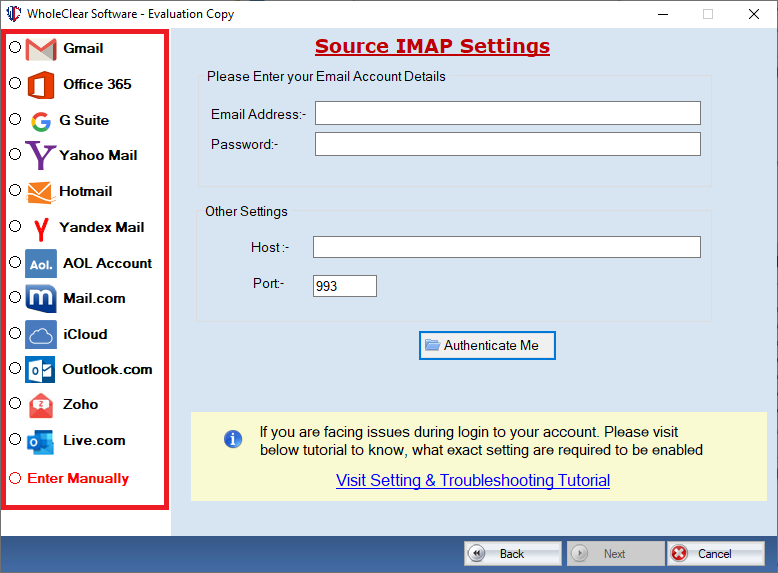
- Provide the credentials of your IMAP account and press Authenticate Me tab
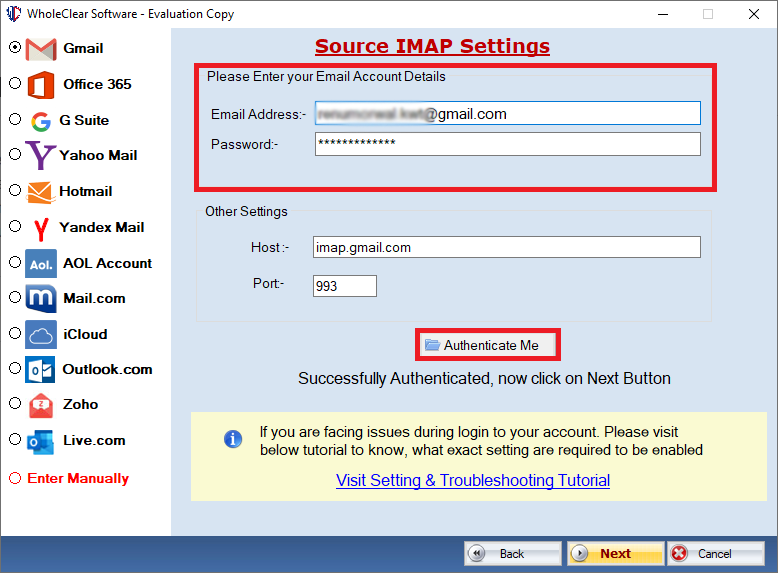
- Deselect the folder that you don’t want or select by date range
- Select the output format of your choice
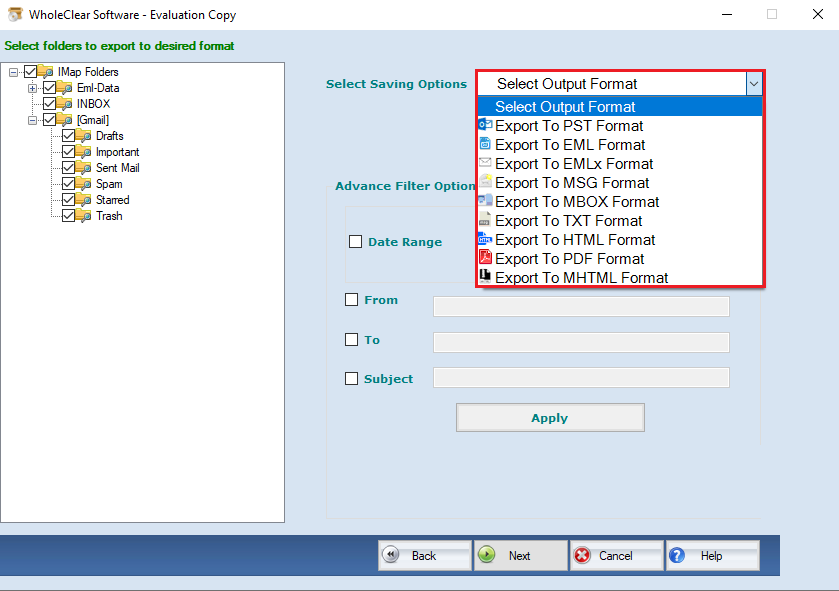
- Select the output location to save data and press Apply
Conclusion
It is easy, quick and reliable to go with a backup application to backup IMAP accounts’ data. You can consider an application after its ratings and free trail.