WholeClear COX Mail Backup Tool to Backup COX Emails Freely
- Save COX emails into diverse formats – PST, PDF, EML, MSG, MBOX, EMLX, HTML, etc.
- Retain the data integrity during COX Email server backup
- Download COX Emails with attachments to the required format
- Simple GUI for trouble-free handling by novice users
- Filter option is available for desired data backup
- Workable on the latest Windows 11 and older editions
- No file size limit imposed to backup COX Email data
- High-speed backup of all email folders of the COX webmail account
- Fully secure program, no worries of losing database
- Batch mode is available to backup COX mailbox data
- Preserve original properties of COX emails during backup
- Freely backup 25 emails per folder with the demo version
- Desirable path to save the downloaded data
Remarkable Features of COX Email Backup Tool
Get the detailed features of the tool to backup COX Mail Emails
Successfully Backup COX Webmail data
This COX Backup Software offers an instant way to back up single or multiple email folders of a COX webmail account to the local system. Without any inconvenience, users can smartly download all email folders or desired ones to any selected file format. There is no harm to the original database throughout the backup process.
Different Saving formats are available
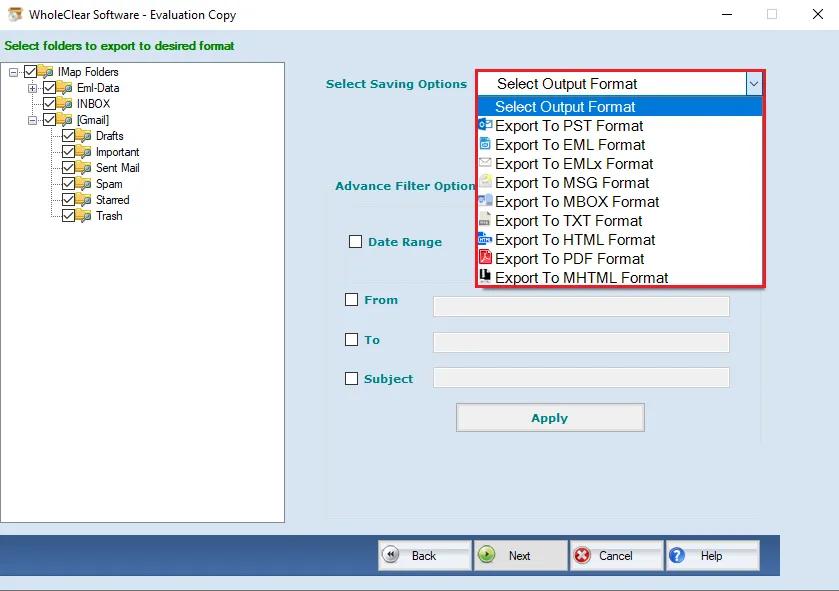
You will get multiple file formats to save the backup. This utility allows exporting COX emails into PST, PDF, EML, MSG, EMLX, MBOX, HTML, TXT, and MHTML formats. With all attachments, the software can export COX email data to any of these file formats. Thereafter, users can read the output files on supported email clients like Outlook, Thunderbird, Apple Mail, etc.
Date-Range Filter option
This program will offer you a date-range filter option which helps in downloading desired emails. Users have the option to choose email folders or they can go for this ‘date-range’ filter for a deep selection of emails for backup. With this filter, users need to enter both dates i.e. beginning & ending to backup COX mailbox data.
Hold Data Integrity and Hierarchy
This effortless solution understands the requirements of users hence it maintains complete data integrity of COX mailbox data. It retains formatting, metadata, hyperlinks, images, etc. Moreover, it keeps all email attachments in their actual format. It even maintains the actual hierarchy of the entire database throughout the backup task.
Accessible on all Windows OS
This COX Email Server Backup Tool is truly amazing to run on all versions of the Windows operating system. You can simply install this app and complete the backup task on Windows 11, 10, 8, 7, and other editions. There is no issue of compatibility with this program as it effectively works on different Windows editions.
Perfect and Trusted Solution
With high speed and perfection, the software saves COX webmail emails on the local system. When you have this brilliant solution, there is no need to worry about data loss at all. This highly tested program can comfortably and harmlessly export COX Webmail data on a desktop with complete accuracy.
Freeware Backup Option
Before investing in this professional tool, users can verify its capacity and exactness by downloading the free trial edition. This freeware option will work exactly as the license version. However, it can save only the first 25 items per folder from your COX webmail account. For the whole data backup, users can get the license version.
Simple to utilize
Handling this software is too simple as it comes with a friendly layout and self-defined steps. Without any discomfort, all users can operate it, and smoothly takes a backup of COX mail data. Only basic computer knowledge is enough to utilize this third-party program. You can check this in the free trial version.