

Emails saved in MBOX format are easily accessed via web browsers or email programs but what happens when users want to open MBOX files in Outlook. Then, it needs migration of MBOX emails into Outlook MSG file format.
Well, in this article, we will help you to find one of the smartest solutions to export MBOX emails as Outlook MSG files i.e. MBOX to MSG Conversion Tool. This software allows users to migrate MBOX data items into MSG format with associated attachments.
The utility works completely independently and allows bulk migration of MBOX files into MSG file format. Keeping all data items intact, MBOX files data is moved into Outlook MSG file format.

Download this Program to Export MBOX Database to MSG for Free
The trial version of the software will help users to export the first 10 items per folder for free. With the demo version, users can simply evaluate the software’s performance before buying it.
You can directly download the demo version and simply perform the conversion without any hassles. It is completely the same as the license version.
How to Convert MBOX data files into Outlook MSG?
By following this guide, you will learn how to export emails from MBOX format to Outlook MSG format. One can simply convert unlimited emails to MSG from MBOX format by following these steps:
- Launch the software on any Windows system and open it.
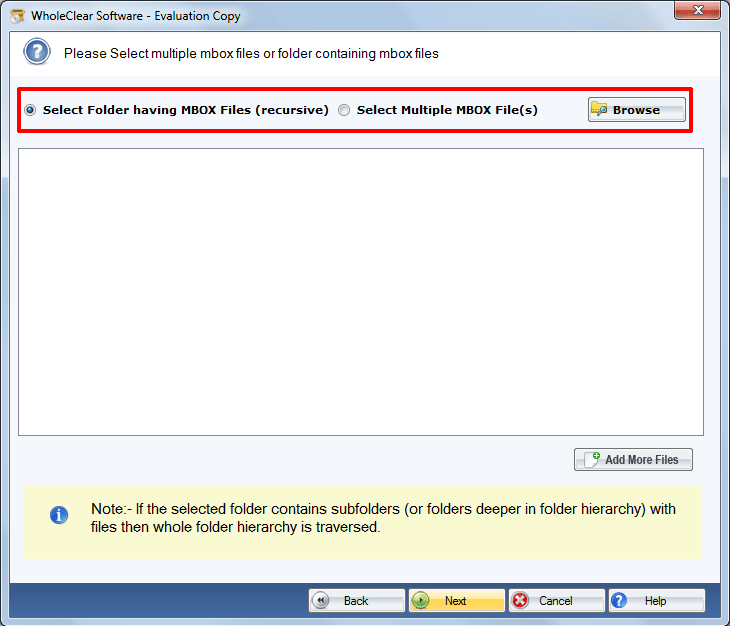
- In Input MBOX type, choose File mode or Folder mode. Then, use the Browse button for adding MBOX files to the software panel from your system.
- Use the given Browse button and set a destination path to save MSG files.
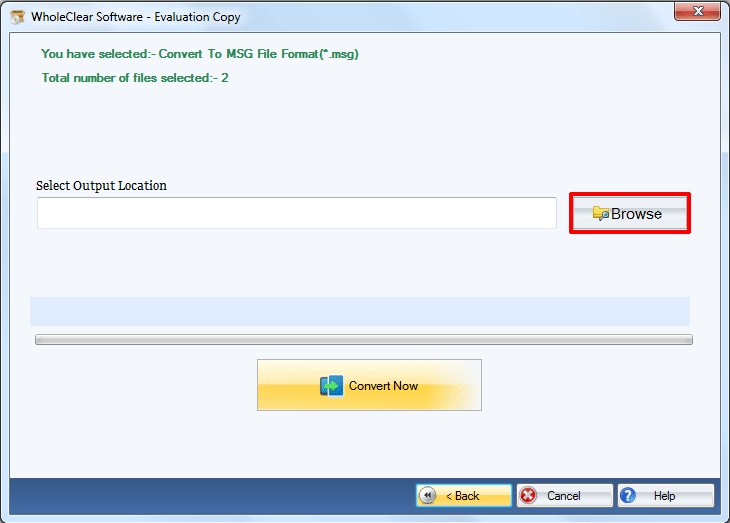
- Hit the Convert Now button. This successfully completes the conversion process.
Once MSG files are provided, users can easily open them with Outlook 2019, 2016, 2013, 2010, 2007, 2003, etc.
From the above steps, you can easily conclude that users can easily export MBOX mailboxes into MSG file format without advanced technical knowledge.
Few Main Remarkable Features of MBOX to Outlook MSG Converter
The software is designed with advanced algorithms to export MBOX email items into MSG file format. Some of the main features provided by this utility are: –
- Allows Batch Conversion: The software comes with a batch conversion facility. This will allow users to load any number of MBOX files at once to export into MSG file format.
- Auto-detect Thunderbird mailboxes: The software gives the option of auto-loading mailboxes from the Thunderbird email client to export into Outlook Messages format.
- Support all MBOX-based email clients: Around 25+ email clients are there that support MBOX file format. This valuable program suitably supports MBOX files exported from these email clients to import into Outlook MSG files.
- Graphical User Interface: The interface of this software is friendly to use. No confusion is even faced by novice users to operate the program. All the steps are self-explanatory so no problem is faced by users in executing the steps.
- Preserve Actual Folder Hierarchy: There is no disorganization in the actual folder & subfolder structure of MBOX files during and after the conversion. MBOX files are exported into MSG files as it is as they were earlier.
- No supported application installation: You don’t need to configure any email client on your system for performing this conversion. This amazing application works in a standalone environment.
- Free Demo Availability: A free trial of this utility is offered for all users so that they can test the program first and then get the license keys. This will export the first 10 items per folder but provide the same speed and performance.
Wrapping Up
The software discussed in this post allows users to migrate the MBOX database into Outlook Messages MSG file format. The program will convert MBOX emails with all attachments into MSG file format. Through this solution, we tried to resolve all queries of users regarding MBOX data files into Outlook MSG conversion. For further queries regarding this conversion, do contact our support team.