Restore Exchange Backup Software to restore PST files to Exchange
- A safe and easy handling tool to restore Exchange database
- Restore all data from PST file to Exchange Server
- Support all healthy and any size PST file
- Multiple mailboxes restoration from PST to MS Exchange Server
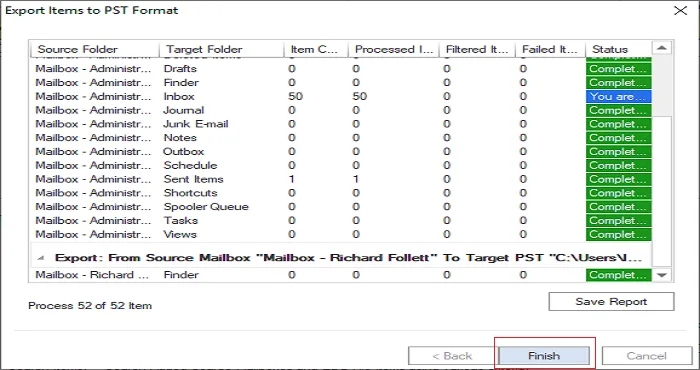
- Provides full report of the Exchange items restore process
- Various filters to restore desired data from PST to Exchange
- accurate and smart results with no losses
- Friendly interface to use easily by beginners
- Evaluation copy for all users
- 24*7 customer service via emails or live chat
- Installable on latest Windows versions
- Scan and Preview added PST data items
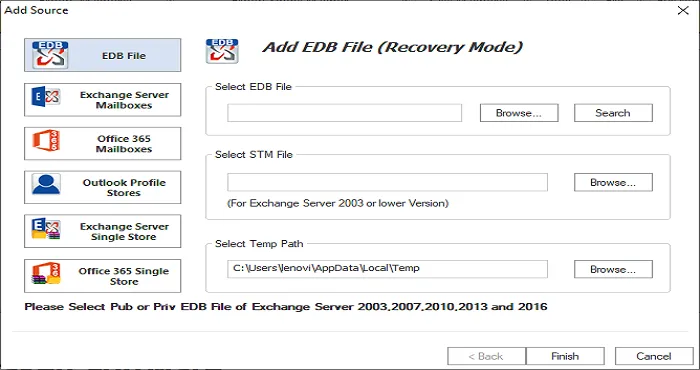
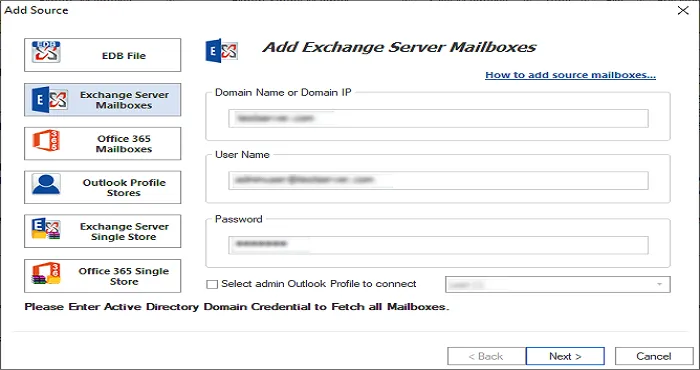
- Smoothly restore backup file to Exchange in 4 easy steps
Key Features offered by WholeClear Restore Exchange Backup Tool
Restore Exchange Backup Software detailed features
Restore PST file to Exchange Server
The software is programmed so that users can restore data from the backup file. It works effectively on all Windows platforms and allows users to restore data from PST file to Exchange Server. All items of PST file are conveniently restored to Exchange Server by using this professional solution that is not possible with any manual technique. No loss or corruption chances are there with this tested and authentic program.
Simple to configure & use
The complete process of restore data from Exchange backup file is too easy. Users can smartly understand the working of the software without possessing technical skills. No problems are faced by users in operating the software. To install & launch the program, a few seconds are consumed and after that, users have to follow the instructions as guided by the software. By the friendly interface of this tool, it is highly in demand among users.
Independent program
No requirement of any supportive program in the system to use WholeClear Restore Exchange Backup Software. It is fully independent to use without depending on any external program. What users need to do is to fulfill the basic needs of the system so that the software can work in a smooth manner. After that, users can operate the software on any Windows systems like Windows 10 and Windows 11, 2000, and below versions.
Hold original data items
All the original data items are well protected while restoring mailboxes from PST file to Exchange Server. There is no misplacement of a minute detail to restore PST data to Exchange Server. All attachments, emails, contacts, notes, calendars, are smoothly transferred from PST to Exchange Server keeping all email formatting intact. Also, the actual hierarchy of subfolders and folders is completely maintained throughout the exchange restoration process.
Date Range Advanced Filter
Users are free to restore complete PST data items to Exchange Server. However, users have the facility to restore desired data from PST to Exchange Server. They can simply use Date Range and Message Class filters and restore specific items from PST data into Exchange Server. These filter options will help users to get rid of unwanted data that users don’t want to restore from PST file to MS Exchange Server. Users can restore PST data to all versions of Exchange.
Provide log report
The entire restore exchange backup process details are saved into a report. This report is generated automatically by the software. This report can be saved by users. The report show you all details of the Exchange backup restoration process. This report generation is one of the remarkable features of WholeClear Restore Exchange Backup Software. This report can be saved by users at their local system.
Customer Support 24x7
Due to the friendly interface, users will not face any difficulties while handling this program but still users can clear all their doubts by contacting our support team. Our technical team is available 24*7 and users can reach them through emails or live chat support. All pre purchase and post purchase queries of users are resolved by the team.
Demo version for everyone
A free trial of the software is available so that users can test the software & its working prior buying it. Users can get full overview of the product without investing in it. The working speed and functions of the demo version are same as the license one but it can restore only first 50 items per folder using the demo version.