NSF to IMAP Migration Tool to import NSF files to IMAP
- Effortless conversion of Lotus Notes emails into IMAP Server
- Include attachments while migrating NSF emails into IMAP account
- Completely error-free and tested utility by professionals
- Show you live conversion and create a report of the migration process
- Pre-install Lotus Notes application before starting the conversion
- Import NSF data items into multiple IMAP Servers with correct login details
- Tested program to render accurate results
- Email properties of Lotus Notes and file structure are preserved
- Multiple NSF files conversion at once without any hindrances
- Online Chat Support round the clock
- Show NSF files and their number before migration
- Free evaluation copy for all to judge the program
- Suitable for home as well as business users
- No bar for NSF file size to migrate IBM Notes to IMAP
Get into details of NSF to IMAP Converter Tool
Find features of the software to upload NSF files into IMAP
Upload Lotus Notes NSF file to IMAP
This is one of the best and easiest programs that can help users to migrate Lotus Notes files into IMAP Servers. It comes with 4-5 simple steps that users need to follow to complete the migration. This program has simplified the way to upload Lotus Notes to IMAP Servers with their associated attachments. With a few minutes, the migration can be comfortably carried out by this application.
Suitably work with all Lotus Notes versions
Users can upload all NSF files into IMAP Servers. The program suitably migrates NSF file created by Lotus Notes 11.0, 10.0, 9.0, 8.5, 7.0, 6.0, and below versions. All healthy files regardless of their file size are successfully considered by the program. Users can selectively choose NSF files and migrate them simply to desired IMAP Servers with this software.
Dual choice to load NSF file
Users have two options i.e. File and Folder mode to load Lotus Notes NSF files for migration. If users have a single NSF file, they can choose File mode but for multiple NSF files, Folder mode is available that simply migrate multiple NSF files into IMAP account at a single migration process. Users can save a lot of valuable time and effort with Folder mode instead of repeating the same process for each NSF file.
Lotus Notes installation compulsory
It should be kept in mind that prior initiating the migration process of Lotus Notes NSF items to IMAP account, it is mandatory to properly install and configure Lotus Notes in the conversion machine. Without Lotus Notes installation, the migration of NSF emails to IMAP Servers is not possible. However, users have full freedom to install any edition of Lotus Notes email client.
Maintain folder hierarchy & email properties
Don’t take stress for the original database while the migration process. The program is safe to use and keep all NSF file details intact throughout the conversion task. It preserves all email components such as subject, date, time, to, cc, bcc, from, email formatting, etc. Moreover, the internal structure of NSF folder and subfolders remains the same after the migration.
Installable on almost all versions of Windows
No need to upgrade your Windows OS to run this program. The software has no issues in installing it on any version of Windows. It can comfortably convert NSF items into IMAP Servers on Windows 10 and Windows 11. Apart from this, Windows 32-bit and 64-bit versions are also supported to install this program.
Self-introductory steps
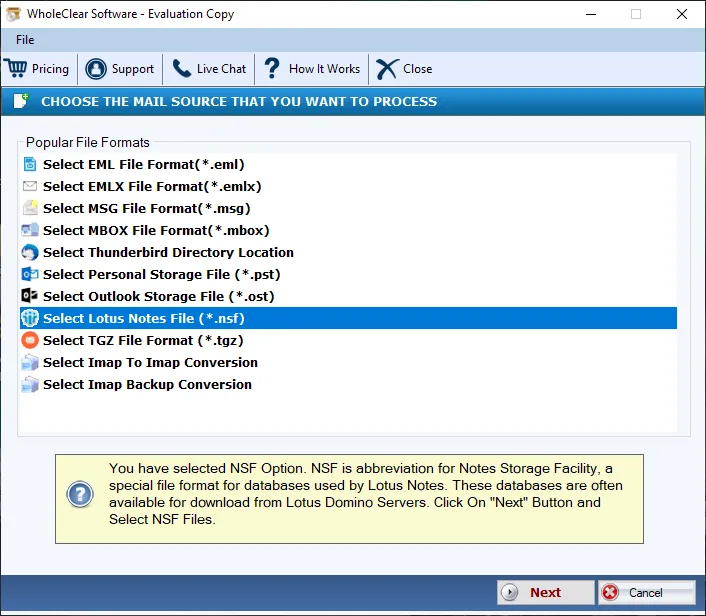
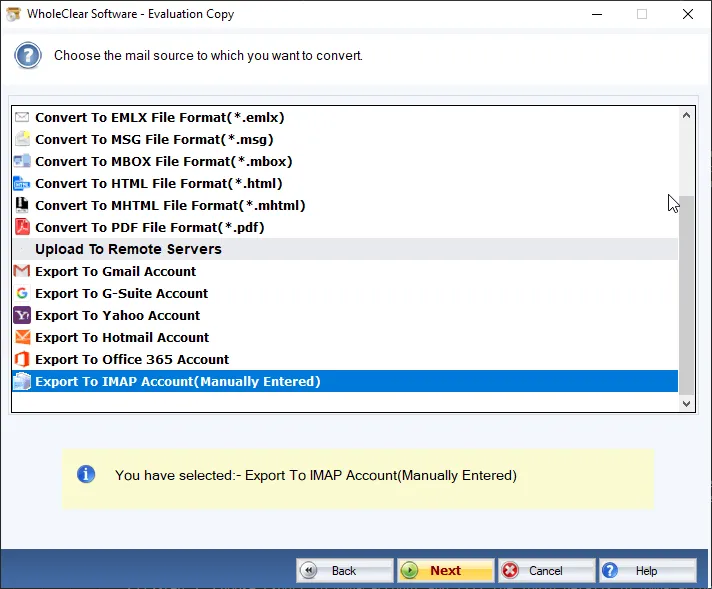
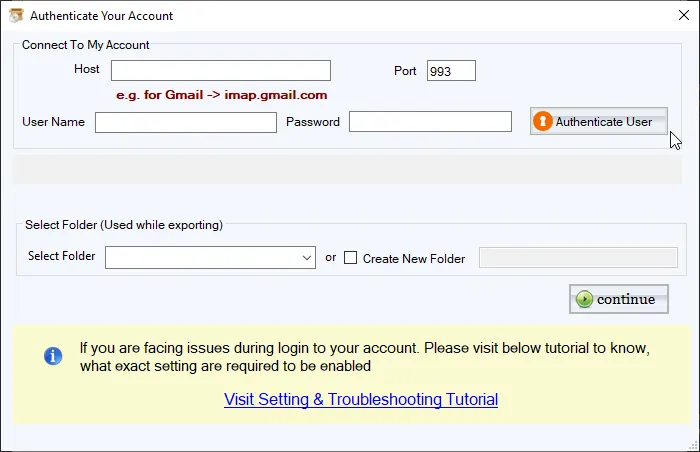
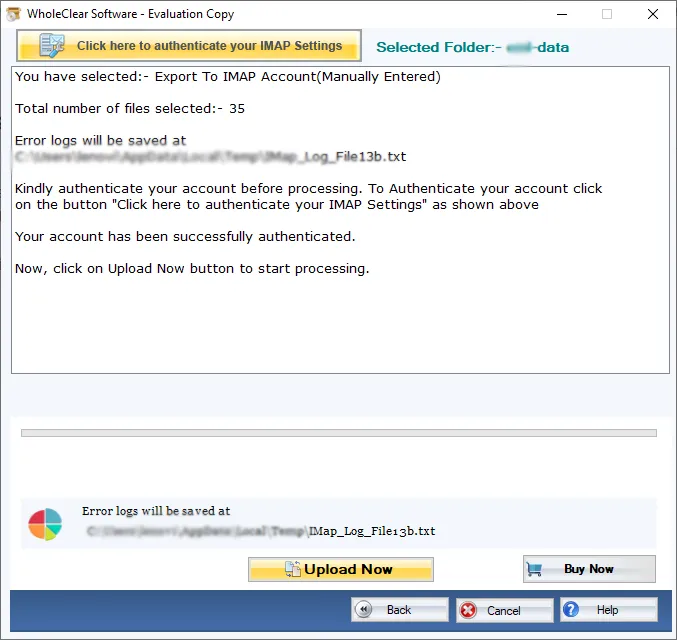
The guiding interface, screenshots, and working guide is there to make the migration process simpler for users. Not only this, users will find the steps of NSF to IMAP migration easy to follow. These steps include adding NSF file, entering IMAP account login details, choosing NSF file location, and Migrate. All the steps are easily carried out by technical as well as non-technical users.
Download free trial anytime
If you have any confusion regarding the performance of the software. You have the option to download the freeware edition right now. This will showcase you all features and working efficiency before you invest your money in it. The demo edition offers you migration of first 25 items from each folder of NSF 2 IMAP Server. For any kind of queries, you can ask our support staff 24*7.