MSG to O365 Converter to import MSG files to O365
- Instant and accurate conversion of MSG files to Exchange Online
- Import whole data of Outlook MSG file – emails, email properties, and attachments.
- Offers a simplified graphical interface to perform the migration
- No requirement of MS Outlook installation
- Convert selective folders of MS Outlook MSG file
- Include attachments while converting Outlook MSG files to Office 365
- Support bulk conversion of MSG files to O365
- Preserve MSG header and metadata
- Maintain folder and subfolder hierarchy of MSG files
- Completely safe and secure application with original data preserved complaints
- Free version availability to export MSG data to Office 365
- Operable on all Windows platforms
- Permit exporting MSG file of all Outlook versions
Key features of Outlook MSG to O365 Migration Tool
Detailed features to import MSG files to MS Office 365
Convert entire MSG file
The software supports complete import of all details of MSG file while keeping original data. The emails, attachments, and email components like to, subject, bcc, sender address, receiver address, etc. are exported in a safe manner. No matter with the size and number of MSG files to export into Office 365 account.
Retain MSG attributes
The properties of MSG files are well preserved throughout the migration. Without any alterations to the original files, any user can export MSG data to Office 365 account. The email headers such as to, cc, bcc, subject, from, hyperlinks, images, font style, etc. remains the same after the conversion. You will find no changes to the actual files.
Mass conversion of MSG files
Now, users can get rid of the repeated process to export MSG file one by one to Office 365 account. Users easily import multiple MSG files to Exchange Online. There will be no effect on the working and quality of the files due to the quantity of MSG files. This feature of MSG to Office 365 Tool will help users in saving a lot of time and efforts of users.
Dual mode to migrate MSG files
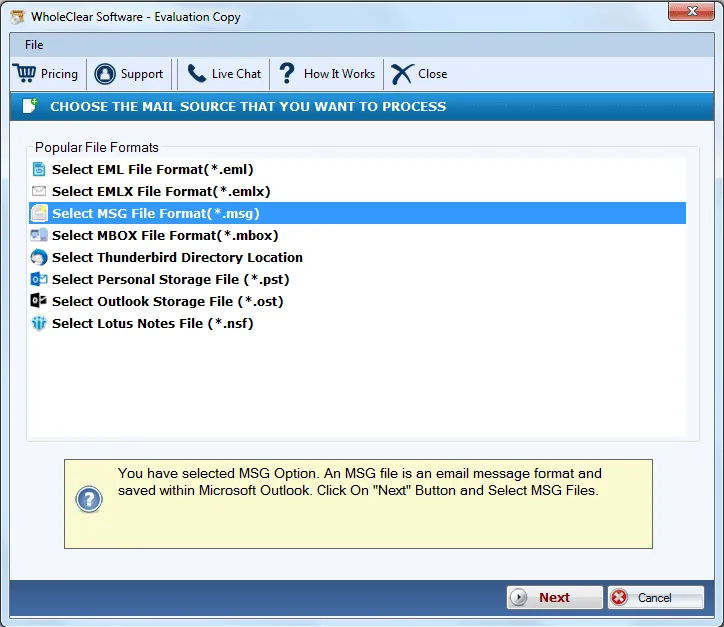
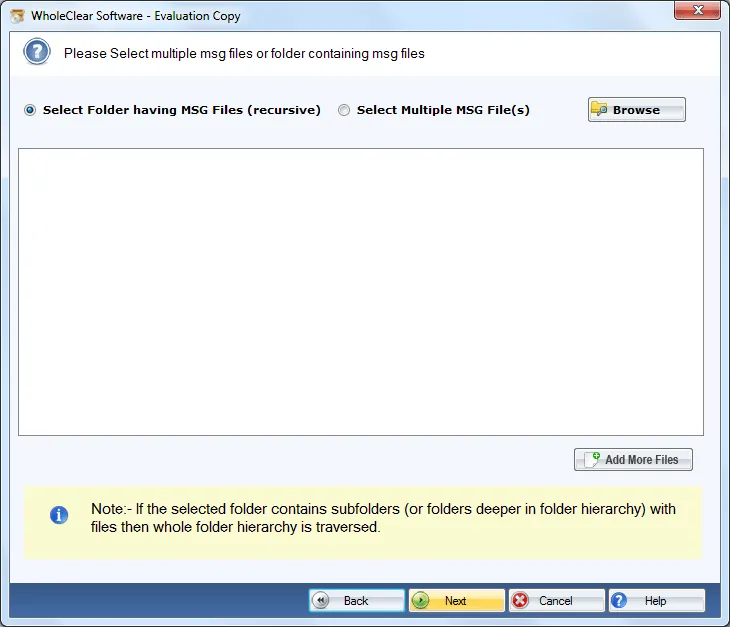
The program offers two modes to add Outlook MSG files – File and Folder. Using any of the modes, users can complete the migration task. Folder mode is helpful to users by which various MSG files get exported into Office 365 account without any trouble. Without any errors, one can seamlessly complete the migration process in a few minutes.
Standalone utility
WholeClear MSG to Exchange Online Tool does not demand installation of MS Outlook or any other tool to finish the migration task. Without Outlook availability, one can upload MSG data to O365 account. Additionally, the program does not differentiate in the versions of MS Outlook. It works comfortably with all MSG files.
Operable on all Windows OS
As the software is completely designed for the Windows operating system so you can simply launch it with every Windows version. No disturbance is created by the application on any Windows platforms (32bit and 64bit). The latest Windows 10 and other versions such as Windows 10 and Windows 11and 10 are well supported.
Preview and select MSG files
Users can easily select the required MSG files irrespective of their number. The process of conversion starts with the scanning of MSG files. Once the files are scanned, users can get a complete list of selected MSG files which are ready to move into Office 365 account. This will help users to check the accuracy of the files before they migrate.
Easy to understand utility
Not only the wizard of WholeClear MSG to O365 Converter is easy to understand but also the process of conversion is somehow familiar to all users. Due to this, even a beginner would not face any troubles in operating the software. It hardly takes less time to export MSG data to O365 as compared to other solutions.